
The real problem with image‑to‑video isn’t that AI can’t make motion anymore—it’s that most people never get access to the best motion in a way that feels usable.
You either get a friendly tool with “okay” results, or you get elite models that feel like a cockpit: powerful, intimidating, and easy to waste time (and credits) inside.
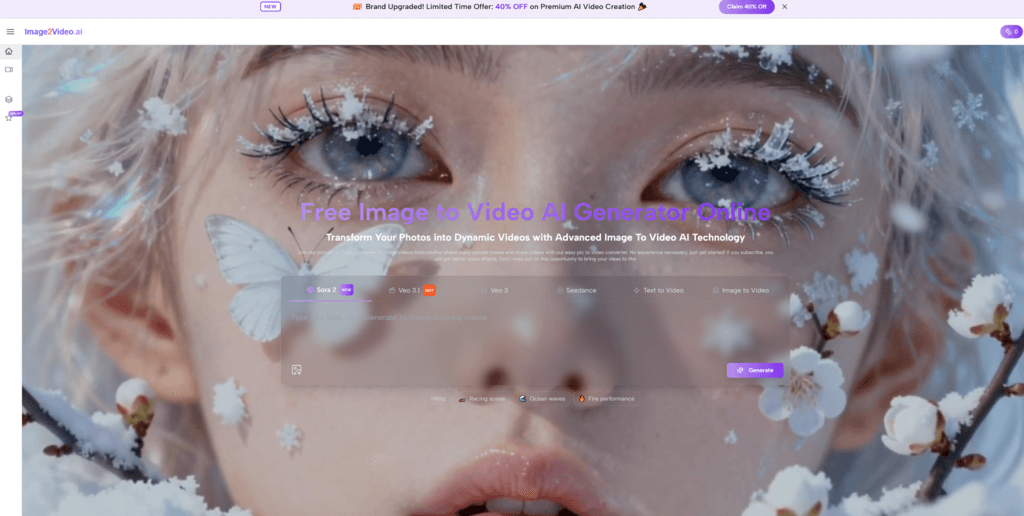
That’s why the most compelling angle of Image to Video is this: it brings world‑class, top‑tier image‑to‑video model options (including Veo 3 and Sora 2) into a workflow that stays human—upload, customize, generate, download.
The Real Pain (PAS): When “Good Enough” Motion Isn’t Good Enough
Problem: your stills are strong, but the motion looks generic
You’ve probably seen it: the same floaty camera move, the same “AI sheen,” the same vibe no matter what the original photo was. It technically moves—but it doesn’t feel directed.
And when you’re building a brand, selling a product, pitching a client, or trying to stand out on crowded feeds, “technically moves” is not a strategy.
Agitate: mediocre motion costs more than time
Bad motion is sneaky expensive:
- It makes high-quality photos look cheaper than they are.
- It adds doubt (“Is this brand serious?”).
- It forces you into extra iterations—more prompts, more retries, more second‑guessing.
In other words: the worst outcome isn’t failure. It’s nearly‑there.
Solution: combine a simple workflow with elite model choices
The difference between “a moving photo” and “a shot with intention” often comes down to one thing: the model ceiling.
Image2Video AI’s advantage is not that it turns you into a VFX artist. It’s that it pairs:
- A simple, repeatable workflow (upload → customize → generate & download)
with
- Top-tier image‑to‑video model choices (e.g., Veo 3 and Sora 2)
That pairing is rare—and it changes what’s possible.
Why Top Models Matter (Without the Hype)
Think of it like engines, not apps
Most image‑to‑video tools are like buying a car where you can’t choose the engine. It drives… but you don’t get a say in how it accelerates, handles, or sounds.
Model choice is the engine choice.
When you can choose among world‑class models, you’re not just changing quality—you’re changing the character of motion:
- how the camera feels (weight, smoothness, intention)
- how scenes hold together over time (coherence)
- how “filmic” the result can look, given the same starting image and direction
That’s the difference between a clip that’s merely acceptable and one that makes people pause mid‑scroll.
How It Works: Same 3 Steps, Better Motion Under the Hood
A workflow you can teach in one sentence
You don’t need a course or a complicated setup. The loop is simple:
- Upload your photos
- Customize your video
- Generate & download
No timeline. No keyframe maze. Just a clear hallway from still → motion.
My direct experience: “power without punishment”
When I tried a top-model workflow, what I wanted was a clean loop: try an idea, see motion, adjust, try again—without feeling like I needed a certification.
What stood out was how quickly I could iterate while still aiming for higher-end results. It didn’t feel like I was locked into one “house style” of motion. It felt more like I could steer the outcome through customization and re-generation.
That “fast loop” is what makes elite models actually useful. Raw power without iteration speed is just expensive frustration.
Before vs. After: From “Animated Photo” to “Directed Shot”
Before: motion is an effect
- You upload an image.
- You get movement.
- It looks like movement was applied to the image.
After: motion becomes storytelling
With top-tier models in the mix, your output can feel less like a filter and more like a shot:
- the subject feels framed on purpose
- the camera movement feels motivated
- the result feels closer to “mini-scene” than “moving wallpaper”
A helpful metaphor:
Basic tools give you motion like a screensaver. Top models can give you motion like a camera operated by someone who has opinions.
Comparison Table: “One‑Model Tools” vs. Multi‑Model Access (Veo 3 / Sora 2‑Class)
Here’s the practical difference you feel in day-to-day creation.
| Category | Image to Video AI | Other image‑to‑video tools (single/limited model stack) |
| Output ceiling | Higher ceiling: more cinematic motion potential, better “shot feel” | Often capped by one model’s signature look and limits |
| Creative range | Wider range of motion styles and interpretation | Outputs can feel samey across projects |
| Iteration workflow | Repeatable loop: upload → customize → generate → refine | Iteration can feel like guesswork, with less controllable change |
| Consistency across use cases | Easier to match the “engine” to the job (product, portrait, travel, brand visuals) | One engine tries to do everything, sometimes doing nothing exceptionally |
If you create frequently, model choice isn’t a luxury—it’s how you avoid creative sameness.

How to Get the Most Out of Top Models (Without Overprompting)
1) Direct the camera, not the pixels
Even one line can do a lot when it’s about intention:
- slow push‑in on the subject
- subtle parallax depth
- gentle pan revealing context
- cinematic lighting mood
2) Iterate one variable at a time
If you change style, camera move, mood, and subject emphasis all at once, you won’t know what improved the output. Treat it like testing lenses: one change, one result, one lesson.
3) Start with your strongest image
Top models amplify what’s there. Give them a strong frame and they can deliver motion that feels deliberate instead of decorative.
A Grounded Bottom Line
If you’ve used image‑to‑video tools before, you already know the truth: workflow gets you started, but the model ceiling determines how far you can go.
Image2Video AI aims to deliver both:
- a simple, approachable creation loop
- plus access to world‑class image‑to‑video model options—including Veo 3 and Sora 2—so your best idea isn’t limited by a mid-tier engine
If your goal is to make your photos feel like scenes—not just “moving images”—this is how you reach the top shelf without turning creation into a chore.

Chase Ortiz is part of the team at PaigeSimple, where he takes care of all the advertising requests. With a sharp eye for detail, Chase makes sure every advertising opportunity is handled smoothly, helping the site grow and reach more people. His ability to manage these tasks efficiently makes him an important part of the team.